A quick walkthrough
Drag in your own reference, draw with a timer, and reflect on what clicked. Try it below.
"Warm up with some quick sketches"
Add Reference Image

Intent: Warm up with some quick sketches
This is exactly how a session works. Drag in your own image to try it.
The practice loop
Draw, note what clicked and what didn't, move to the next ref. Everything gets saved.
Draw
Timer runs, take your time if you need~
Reflect
Quick tags: what clicked? What's tricky?
Repeat
New subject, new pose, keep it fresh
See patterns
"Oh! Hands get easier after warmups"
Four ways to practice
Pick what fits your energy today. Switch anytime.
Gesture Mode
One tab. Zero friction. Quick warmups with timed intervals and smart constraints.
Structured Study
6-phase deliberate practice loop. Draw from memory, compare, redraw, research, reflect.
Free Draw Timer
Just draw. No pressure. Unlimited time or pomodoro cycles. Still earns XP.
Workflow Mode
Finish what you start. Structured phases for illustration with reference boards.
Reference library
Save refs by category. The app picks randomly so you actually practice variety.
Gesture
24 refs
Face
18 refs
Hands
12 refs
Full Body
8 refs
Drag from anywhere
Pinterest, Google Images, your folders
Auto variety
Drawn refs move aside until you recycle
Cloud sync
References sync across all your devices
A reference library built for the way artists actually think
Visual, intuitive, warm, and zero maintenance.
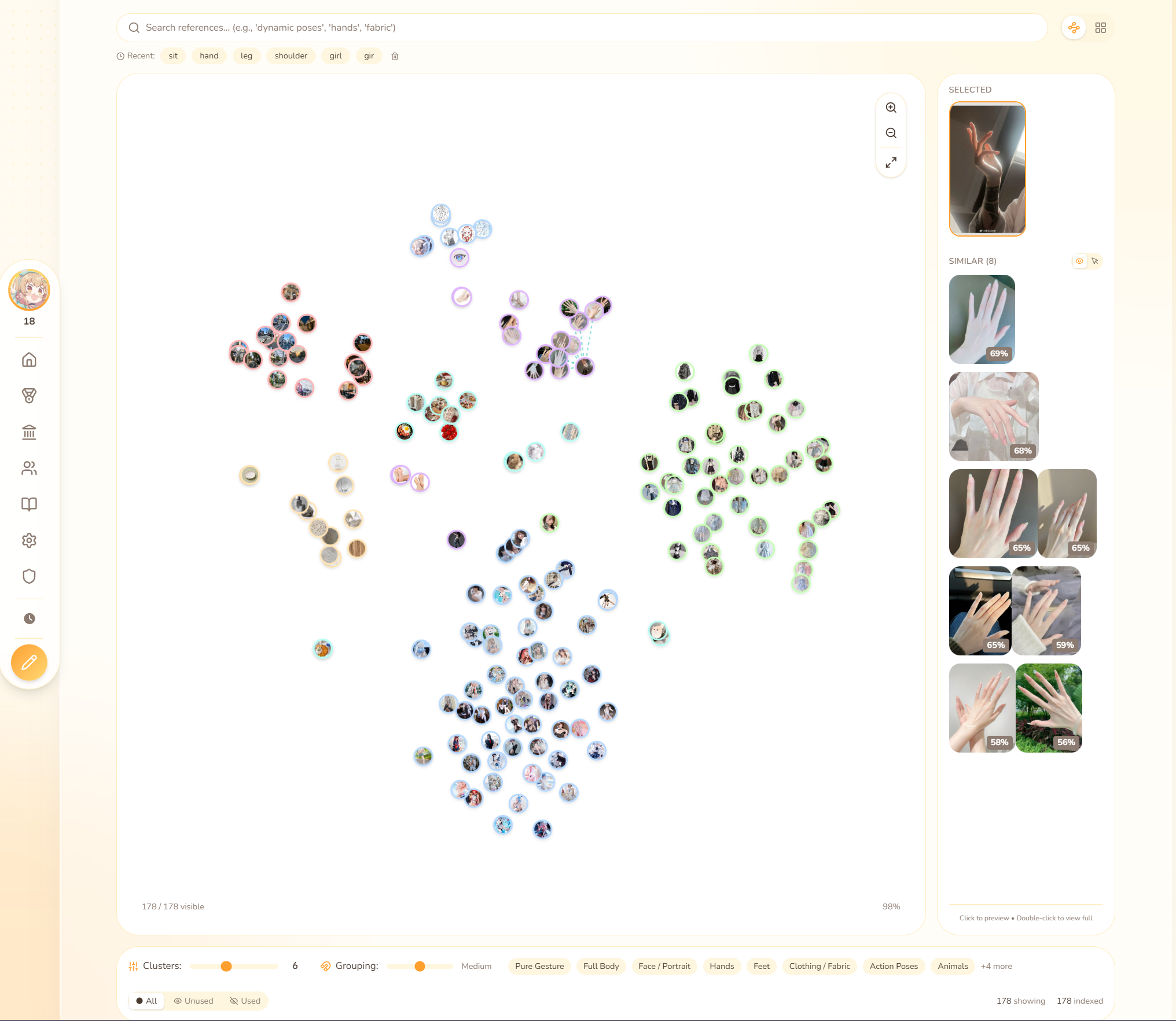
A map of your entire reference world
Instead of folders, scrolling, or endless grids, you get a visual map. Every reference is a point. Similar images cluster together naturally. Zoom in, zoom out, click around. It feels less like a database and more like exploring an idea space. Because that's what your references are.
Your refs group themselves by vibe
Hands gather with hands. Fabric sits with fabric. Soft lighting clusters on one side, harsh contrast on another. No tagging. No sorting. They just know.
Search that understands art words
Type whatever you would say to a friend: "dramatic lighting," "dynamic poses," "something soft." The system understands intent, not just keywords.
One click for similar refs
Tap an image and instantly see others with the same energy. No more "I know I have more like this somewhere."
Cluster controls for whatever study mode you're in
Want broad groups or tight clusters? A simple slider adjusts how the map organizes. Some days you want loose themes; others you want super specific.
Automatic categories that stay out of your way
You drop an image in. It quietly places itself into the right category based on what it looks like. No manual tagging. It just appears where it belongs.
Built by an artist who gets it
This wasn't designed by engineers who think in files. It was shaped by real study habits, by someone who wanted a ref tool that actually supports your creative flow.
What you get
See what's actually hard for you
You rate difficulty and tag what's tricky after each drawing. Use it for a few weeks and you'll see patterns. Which subjects always give you trouble. What time of day you actually sit down. Where you keep going overtime.
Your refs, organized by category
Save references into category bins like gestures, faces, hands, whatever you're working on. The app picks randomly so you get variety. Once you've drawn a ref, it won't repeat until you've gone through all of them. Hit level 10 with 100+ refs and 5 in each bin to unlock auto-sort, which drops refs into the right category for you.
Random variety
Stop doing 100 gestures in a row. Mix it up automatically.
Flexible timing
30 seconds to freeform. Go overtime when you need to.
Levels & streaks
XP, levels, streak shields. Helps you keep showing up.
Everything saved
Every session, every drawing. See where you've been.
Stay consistent
Streaks, daily tasks, and a calendar that shows every day you practiced. Helps you actually stay consistent instead of practicing a lot one week and then nothing for a month.
Daily & Weekly Tasks
Get 5 intent wins
Draw 5 min of Hands
Complete 3 drawings
Log in today
Practice 4 different categories
Complete at least 5 daily tasks
Activity Calendar
Jun
25 daysLeaderboard
Compare by level, time practiced, or streak. Filter by friends, daily, weekly, or all-time.
artflow_pro
P3 Virtuoso
gesturequeen
P2 Illustrator
sketchdaily
P1 Craftsman
inkmaster42
P1 Artisan
draweveryday
Apprentice
11 titles
Earn new titles as you level up. Your title shows on leaderboards and shared sessions.
Novice
Lv 1
Sketcher
Lv 10
Student
Lv 20
Draftsman
Lv 30
Apprentice
Lv 40
Artisan
Lv 50
Craftsman
Lv 60
Illustrator
Lv 70
Virtuoso
Lv 80
Master
Lv 90
Grandmaster
Lv 100
Prestige
At level 100, spend coins to prestige: reset to level 1, keep everything else, and gain a permanent +2% XP bonus. Stack up to P12 for +24% total.
"P5 Grandmaster"
+10% permanent XP bonus
Prestige costs scale: 250, 500, 750... up to 3,500 coins
Practice together, compete together
Create or join a guild with fellow artists. Compete on leaderboards, share activity, and build a community.
Form your creative crew
Guilds let you practice alongside like-minded artists. Create a private guild for your study group, or join a public one to meet new people. Track collective progress, compete for top spots, and celebrate each other's wins.
Roles & permissions
Owner manages everything. Officers can invite members. Everyone contributes to guild stats.
Compete on leaderboards
See how your guild ranks globally. Track member contributions and celebrate milestones together.
Live activity feed
See when guildmates start sessions, hit milestones, or earn achievements in real time.
Collective stats
Total hours practiced, drawings completed, and levels gained. Watch your guild's impact grow.
Public or private
Make your guild discoverable for anyone to join, or keep it invite-only for your close crew.
Level 20 + 1,000 coins
Creating a guild requires dedication. Join existing guilds anytime, no requirements.
Join the practice community
Connect your Discord account and join the Sumi Sketch server for accountability, practice reminders, and a supportive learning environment.
A cozy space for artists learning together
The Sumi Sketch Discord is where practice happens together. Get gentle reminders to draw, celebrate milestones with others, and stay accountable to your art goals. Link your account to unlock Discord features like Rich Presence and role sync.
Practice reminders
Opt-in to gentle daily reminders that nudge you to keep your streak alive. Easy to silence when life gets busy.
Rich Presence status
Your Discord status shows "Practicing Art" when you're in a session. Let friends know you're in the zone.
Prestige role sync
Your prestige level becomes a Discord role in the Sumi Sketch server. Show off your dedication with color-coded ranks.
Session notifications
Share your session summaries in the practice channel. Celebrate wins and encourage others doing the same.
Supportive learning space
Share work-in-progress, ask questions, and get feedback from fellow artists. No judgment, just growth.
One-click account linking
Connect securely through Discord OAuth from your settings. Unlink anytime.
Balanced progression
The XP curve is designed to feel good, not grindy.
S-curve progression
Early (Lv 1-10) ~12 min each. Meaningful progress from the start.
Middle (Lv 11-50) Steady growth. The rewarding phase.
Late (Lv 51-100) Dedicated grind for the committed.
~100 hours to max with typical play. Engaged practice speeds it up.
Stacking multipliers
Session streak Up to 2x after 30 min of drawing
Variety bonus Up to +15% for mixing categories
Random boost 20% chance for +5-10% (surprise!)
Boosters +25% from shop items
Prestige Up to +24% permanent
All stack multiplicatively. Engaged play = faster progress.
Practice with friends
Add friends, see their activity, and compare your progress. A little friendly competition goes a long way.
Add friends by username
Search for artists by username and send friend requests. Build your art practice crew.
See friend activity & stats
Check when your friends last practiced, their current level, and what they're working on.
Compare progress
Side-by-side stats show who's been practicing more. A little competition keeps it fun.
12 smart constraints
Turn warmups into deliberate practice. Mix and match, or use presets like Speed Sketch, Shape Control, and Values Focus.
Each constraint forces you to focus on specific fundamentals. Combine them to target your weak spots.
No Undo
Commit to your marks. Builds confidence and forces intentional strokes.
Limited Values
Posterize to 3-5 values. Focus on light and shadow without getting lost in detail.
Stroke Budget
Limited strokes force you to be economical and capture essence, not details.
99
achievements
🦉 "3 AM Artist"
💪 "One Hour of Power"
⚡ "Speed Runner"
100
levels
~100 hours typical
~75 with all multipliers
🪙
economy
Earn from tasks & levels
Spend on boosters & shields
The little things
Frequently asked
Quick answers to common questions
Yes! All the drawing and practice features are completely free. No trial, no paywall, no catch.
Only for Gesture mode's digital canvas (iPad, Wacom, etc). For Study mode, Free Draw timer, and Workflow? Use any medium you like - the app is a practice companion that handles timing, references, and structure.
Procreate and CSP are for making finished art. SumiSketch is for the practice that makes your finished art better. Structured warmups, study loops, progress tracking. Think of it as your practice gym, not your studio.
Absolutely. Upload images directly, paste from clipboard, or import from URLs. Your reference library is private by default and searchable once you've added enough images.
Yes, completely. Your sketches, references, and progress data are private by default. You can optionally share sessions with friends on Discord, but nothing is public unless you choose to make it so.
That's it. Wanna try?
Built by an artist, for artists. Find me practicing here too.
Let's gomade with by howlongismyname
This site is in beta. You may encounter bugs or missing features.